
"Our integration with the Google Nest smart thermostats through Aidoo Pro represents an unprecedented leap forward for our industry."
- Antonio Mediato, founder and CEO of Airzone.
The question is not whether SharePoint can store documents or support collaboration. They already know that. The better question is this: how can SharePoint Development Services turn an existing Microsoft 365 investment into a more secure, automated, and AI-ready digital workplace?
That is the real focus of SharePoint Development Services in 2026. Businesses are looking for the right way to use SharePoint to reduce operational friction, improve governance, support hybrid teams, and prepare content for Microsoft 365 Copilot.
Many organizations already use Microsoft Teams, Outlook, OneDrive, and Microsoft 365 apps every day. The challenge is not a lack of tools. The challenge is that information often becomes scattered across chats, folders, emails, and local drives.
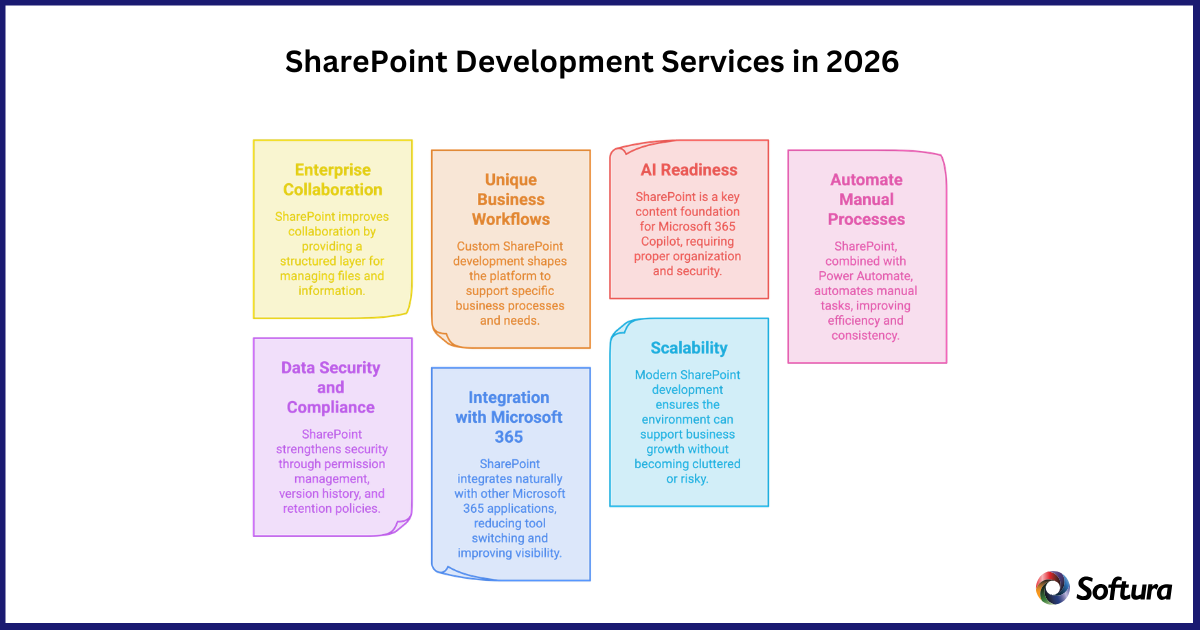
SharePoint helps solve this when it is developed as a structured collaboration layer. It gives teams a shared place to manage files, project content, knowledge bases, policies, and department-level information.
A well-developed SharePoint environment helps leaders create:
"Our integration with the Google Nest smart thermostats through Aidoo Pro represents an unprecedented leap forward for our industry."
- Antonio Mediato, founder and CEO of Airzone.
Every business has processes that do not fit perfectly into an out-of-the-box platform. A manufacturer may need supplier document approvals. A healthcare organization may need controlled access to sensitive records. A professional services firm may need proposal libraries, client portals, and contract review workflows.
Custom SharePoint Development Services help shape the platform around these real business needs. Instead of asking employees to change the way they work, SharePoint can be configured and extended to support how work actually happens.
Common examples include:
"By analyzing the data from our connected lights, devices and systems, our goal is to create additional value for our customers through data-enabled services that unlock new capabilities and experiences."
- Harsh Chitale, leader of Philips Lighting’s Professional Business.
In 2026, SharePoint is one of the primary content sources Microsoft 365 Copilot uses to retrieve organizational knowledge, making strong information architecture, content governance, and permission management critical for AI success. Copilots can only be useful when the information it works with is accurate, current, well-organized, and properly secured.
This is where many businesses face a hidden problem. If SharePoint sites contain outdated files, duplicate content, unclear permissions, and weak metadata, AI tools may surface incomplete or unreliable information.
SharePoint Development Services help prepare the environment for AI by improving:
For C-level leaders, this is important: AI readiness is not only a technology initiative. It is also a content discipline. Before organizations expect AI to improve productivity, they must make sure their knowledge base is clean, secure, and easy to understand.
"By analyzing the data from our connected lights, devices and systems, our goal is to create additional value for our customers through data-enabled services that unlock new capabilities and experiences."
- Harsh Chitale, leader of Philips Lighting’s Professional Business.
Manual approvals, repeated follow-ups, and spreadsheet-based tracking slow down operations. SharePoint becomes far more valuable when it is combined with Power Automate to create structured workflows.
This can help automate business processes such as:
For example, a policy document can be uploaded to SharePoint, routed automatically to approvers, tracked for comments, and published only after approvals are complete. The process becomes visible, auditable, and easier to control.
This matters in 2026 because organizations need to move away from legacy workflow models and modernize automation through supported Microsoft 365 tools. The result is better consistency, fewer delays, and stronger accountability.
"By analyzing the data from our connected lights, devices and systems, our goal is to create additional value for our customers through data-enabled services that unlock new capabilities and experiences."
- Harsh Chitale, leader of Philips Lighting’s Professional Business.
Security is one of the biggest reasons enterprises continue to invest in SharePoint. Business documents often contain contracts, financial information, employee records, client data, intellectual property, and compliance evidence.
SharePoint supports strong security through permission management, version history, audit trails, retention policies, sensitivity labels, and external sharing controls. But these features only work well when they are designed properly.
Without governance, SharePoint can become difficult to control. Sites multiply, permissions become inconsistent, and sensitive files may be exposed to people who no longer need access.
A strong SharePoint development approach helps define:
For executives, the outcome is confidence. The organization can collaborate without losing control of sensitive data.
SharePoint is strongest when it works as part of a connected business ecosystem. It integrates naturally with Microsoft Teams, OneDrive, Outlook, Power BI, Power Apps, Power Automate, Microsoft Lists, Viva, Dynamics 365, and Azure.
This integration helps reduce tool switching and duplicated work. For example, a team can discuss a project in Teams, store documents in SharePoint, automate approvals with Power Automate, and review performance in Power BI.
SharePoint can also connect with ERP, CRM, HRMS, and other enterprise systems through APIs and Microsoft Graph. This brings information closer to the people who need it.
The leadership value is better visibility. When documents, workflows, and business data are connected, teams can make faster and more informed decisions.
A SharePoint environment that works for one department may not work for an enterprise with multiple locations, business units, and compliance needs. Scalability depends on the right architecture.
Modern SharePoint development uses SharePoint Framework, Power Platform, Microsoft Graph, and cloud-based integrations. SharePoint Framework, or SPFx, allows developers to create custom web parts, dashboards, and user experiences in a supported way.
This is important because outdated customizations can become expensive to maintain and difficult to modernize. In 2026, businesses should avoid building short-term fixes that create long-term risk.
A scalable SharePoint environment should be:
Scalability is not only about adding more users. It is about making sure SharePoint can support business growth without becoming cluttered, risky, or difficult to manage.
The right SharePoint Development Services partner should not begin with coding. They should begin with business understanding.
C-level leaders should ask:
These questions help move the discussion from features to business outcomes.
SharePoint Development Services help businesses improve productivity, reduce manual work, and get more value from Microsoft 365. A well-developed SharePoint environment makes it easier for employees to find information, manage approvals, and work from one trusted source of content.
For leaders, SharePoint becomes more than a document platform. It becomes a practical foundation for a more organized, efficient, and scalable digital workplace.
The most interesting aspects of SharePoint Development Services in 2026 are not limited to collaboration, document management, or customization. The real value is how SharePoint helps businesses build a secure, connected, automated, and AI-ready workplace.
When developed correctly, SharePoint can improve collaboration, simplify workflows, strengthen governance, support business intelligence, and prepare enterprise content for the future of AI.
Softura helps organizations modernize and customize SharePoint environments around real business needs. Whether you need a modern intranet, workflow automation, secure document management, Microsoft 365 integration, migration support, or Copilot-ready information architecture, Softura can help turn SharePoint into a practical business advantage.
If your current SharePoint environment feels scattered, underused, or difficult to govern, 2026 is the right time to rethink it with a development strategy built for productivity, security, and long-term growth.
Ready to build an AI-ready SharePoint environment?
Modernize SharePoint with better governance, automation, security, and Microsoft 365 integration. Talk to Softura’s experts to create a SharePoint strategy built for productivity and long-term growth.