
"Our integration with the Google Nest smart thermostats through Aidoo Pro represents an unprecedented leap forward for our industry."
- Antonio Mediato, founder and CEO of Airzone.
SharePoint was never designed to replace a relational database like SQL Server. It was built primarily as a collaboration, content management, and document storage platform. However, over the years, many organizations began using it for storing structured information because the platform is accessible, familiar, and included in Microsoft 365 licenses.
Yet, many organizations treat SharePoint like a database because:
So technically, SharePoint can be used as a database for light applications. But the real question is: Should you use it as one? That is where capabilities and limitations matter.
"Our integration with the Google Nest smart thermostats through Aidoo Pro represents an unprecedented leap forward for our industry."
- Antonio Mediato, founder and CEO of Airzone.
SharePoint handles data using a combination of SharePoint Lists, metadata, and SQL backend storage.
Lists are SharePoint’s closest equivalent to a table. You define columns, data types, and basic validation rules. Users can add, edit, and view items just like rows in a spreadsheet.
Lists support:
This structure is familiar to business users, which is why lists become a “database substitute” for many teams.
Even though users interact with lists, the data is ultimately stored in:
However, admins and users cannot directly run SQL queries or joins. All access is mediated through SharePoint APIs.
A few reasons contribute to this illusion:
But these similarities don’t make it a relational database. They simply make SharePoint look “database-like” on the surface.
"By analyzing the data from our connected lights, devices and systems, our goal is to create additional value for our customers through data-enabled services that unlock new capabilities and experiences."
- Harsh Chitale, leader of Philips Lighting’s Professional Business.
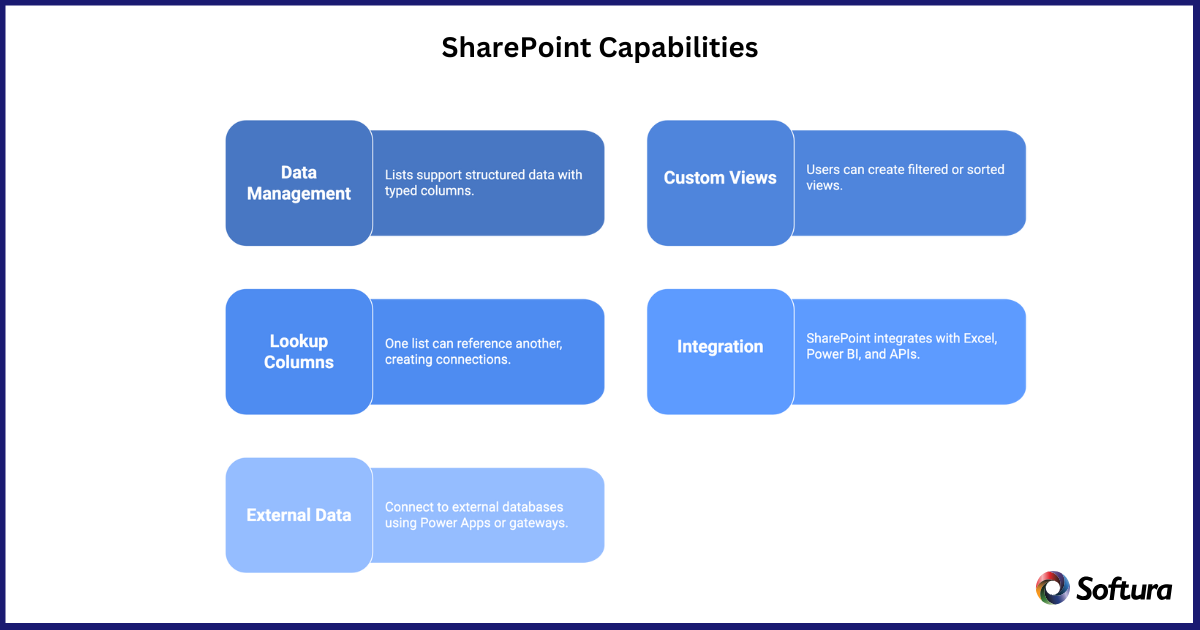
SharePoint provides several capabilities that enable business users and developers to build light applications.
Lists support structured data with typed columns, making it easy to capture consistent information. For internal tools like asset tracking or service requests, this is often enough.
Users can create filtered or sorted views, similar to simple SQL queries. Validation rules help enforce basic data quality, though they’re nowhere near the rigor of a relational database.
Lookups let one list reference another. For example, a “Project” list can link to a “Clients” list.
However, these lookups are:
This is typically where non-technical teams run into trouble.
SharePoint integrates well with:
For reporting-heavy use cases, this gives SharePoint list data more visibility.
Legacy SharePoint supported BCS to connect to external databases. Although retiring in the cloud, the idea still exists through:
This is useful when SharePoint is just the front-end.
Lists often become the backend for small-to-medium applications.
Power Apps lets you build user-friendly forms and apps on top of SharePoint lists. Many clients use this approach for quick wins when time or budget is limited.
Older environments still use InfoPath, though it’s deprecated. Most teams have transitioned to Power Apps.
Lists integrate smoothly with:
This makes SharePoint an attractive choice for non-relational, department-level applications.
Document libraries store files, but the metadata columns often behave like database fields.
Teams use metadata to classify documents by:
This improves search and supports workflows.
SharePoint’s search index crawls metadata, making libraries function like searchable databases for files.
Here’s where most organizations hit the wall.
SharePoint cannot:
If one list references another, nothing prevents:
Microsoft recommends keeping lists under 5,000 items per view. While modern SharePoint can technically store more, performance issues still occur during heavy queries.
Power Apps delegation limits often affect queries. If your app relies on large data sets, SharePoint becomes a bottleneck.
Developers can query SharePoint, but it’s not comparable to SQL for:
SharePoint lacks transactional consistency. If multiple lists must be updated together, you must handle logic manually.
Validation rules are minimal. There is no:
High-frequency reads/writes (like inventory systems) will eventually slow down or fail.
Admins cannot directly query content databases. Everything has to go through SharePoint API layers.
Based on real-world experience, SharePoint works well as a backend for scenarios like:
Examples:
Safe range: 1,000–30,000 items if indexed correctly.
If your data doesn’t require relational modeling, SharePoint is perfectly fine.
Power Apps + SharePoint is often the right combination when speed matters.
Here are the situations where SharePoint becomes more pain than value.
ERP-level complexity will break SharePoint list relationships.
Anything requiring:
…is a no-go.
If your use case resembles a SQL reporting environment, choose SQL or Dataverse.
SharePoint is not ideal for financial, manufacturing, or operational systems where accuracy and integrity are essential.
If you decide SharePoint is the right fit, keep these practices in mind.
Keep lists organized, indexed, and partitioned when necessary.
Instead of multiple dependent lists, use Power Apps or Dataverse when relationships grow.
Since SharePoint can’t enforce relational rules, use:
Regular archiving helps avoid a large list of performance issues.
Prevent misuse by setting clear expectations.
SharePoint is powerful, but it’s not a relational database. It works best for structured lists, metadata-driven document systems, and quick low-code apps built with the Power Platform.
When used within its limits, SharePoint delivers agility, lower development overhead, and strong integration with Microsoft 365. When pushed beyond those boundaries, it quickly becomes a performance and maintenance challenge.
The key is knowing where SharePoint shines—and where SQL Server, Azure SQL, or Dataverse is the better strategic choice. Insights from a well-aligned SharePoint Consulting Service can often help organizations make these distinctions with clarity and long-term scalability in mind.
Used wisely, SharePoint can absolutely serve as a lightweight database for many business applications—just not the heavy-duty kind.
Accelerate App Development With the Power Platform + SharePoint
Design fast, flexible business apps using SharePoint lists where appropriate—and Dataverse or SQL when needed.